visual-generation ·
unsloth
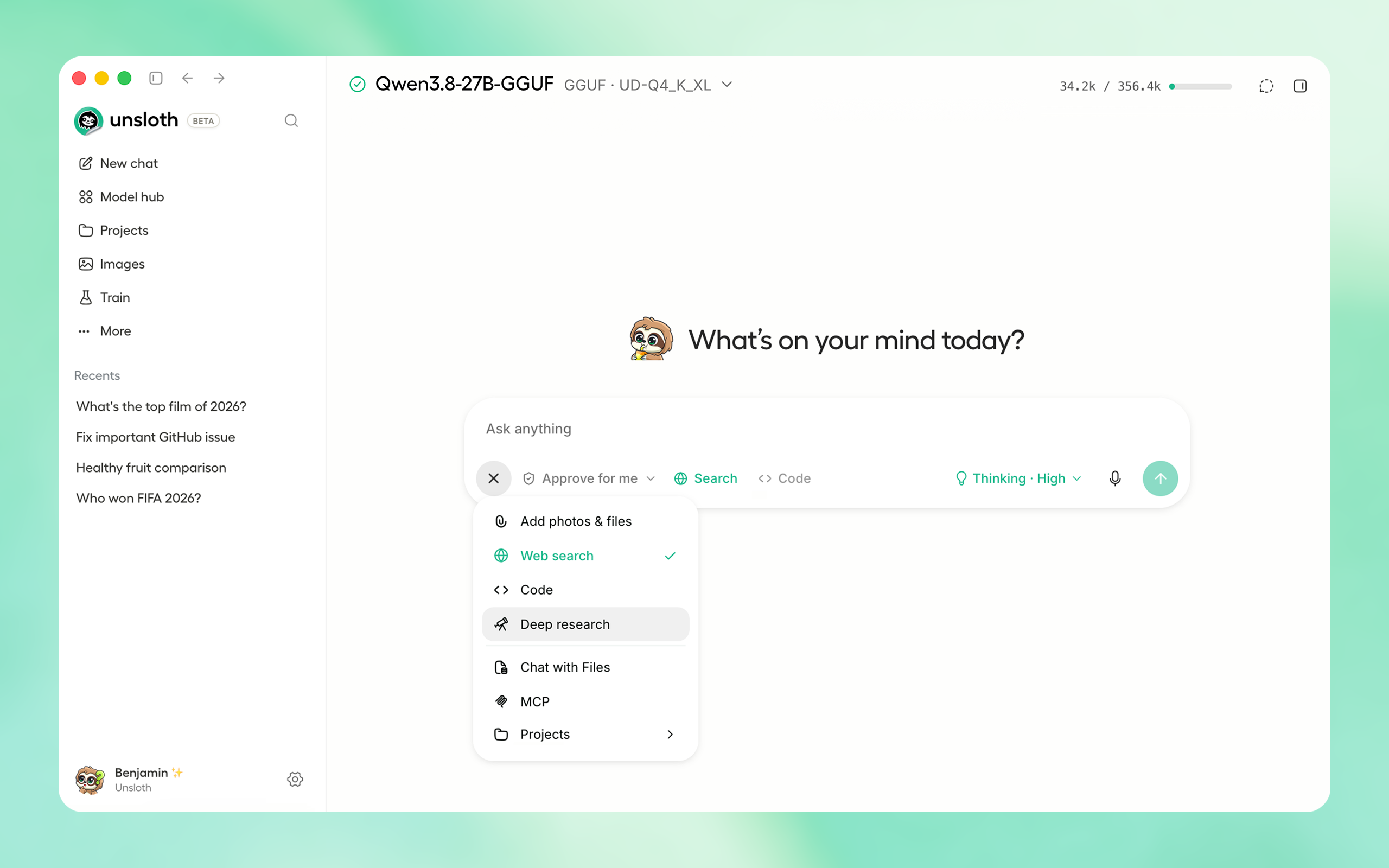
Local UI to run and train LLMs and diffusion models. Supports GGUF, MLX, Qwen3.8, DeepSeek-V4.1, MiniMax-H3, Gemma 4, FLUX and more.

Unsloth is the first desktop app to run and train models.
Features • Quickstart • Notebooks • Documentation
| Platform | Link |
| Windows | Download |
| macOS | Download |
| Linux / Ubuntu (deb) | Download |
| Linux / Ubuntu (ARM64) (deb) | Download |
| Linux (AppImage) | Download |
| Windows (ARM64) | Download |
| Platform | Link |
| Windows | Download |
| macOS | Download |
| Linux / Ubuntu (deb) | Download |
| Linux / Ubuntu (ARM64) (deb) | Download |
| Linux (AppImage) | Download |
| Windows (ARM64) | Download |
For **AMD** there is a separate image: [`unsloth/unsloth-rocm`](https://hub.docker.com/r/unsloth/unsloth-rocm). --- #### Launch ```bash unsloth studio ``` #### HTTP Secure Deployment ```bash unsloth studio --secure ``` #### Remote HTTPS & LAN Access Server-side tools are on by default - so **be careful**! Keep your password safe, or use `--disable-tools` when exposing Unsloth. **Global HTTPS Access**: Creates a free Cloudflare link that serves Unsloth - you can access the link globally (even on your phone!) ```bash unsloth studio --secure ``` `-H 0.0.0.0` and different ports also work: ```bash unsloth studio -H 0.0.0.0 -p 8888 ``` **LAN Access (home network)**: `Settings > API keys > LAN access` #### Password management & headless starts Exposing Unsloth (`--secure`, `--cloudflare`, or a non-loopback `-H`) asks once at the terminal for a new admin password. Ctrl+C there aborts the launch rather than exposing the auto-generated one; set a password non-interactively instead, or use `-H 127.0.0.1` to stay off the network. Headless starts: ```bash UNSLOTH_STUDIO_PASSWORD='your-strong-password' unsloth studio --secure # via env var ``` Reset your password: ```bash unsloth studio reset-password ``` #### Developer, Nightly, Uninstall To see developer, nightly and uninstallation etc. instructions, see [advanced installation](#-advanced-installation). ### Unsloth Core (code-based) #### Linux, WSL: ```bash curl -LsSf https://astral.sh/uv/install.sh | sh uv venv unsloth_env --python 3.13 source unsloth_env/bin/activate uv pip install unsloth --torch-backend=auto ``` #### Windows: ```powershell winget install -e --id Python.Python.3.13 winget install --id=astral-sh.uv -e uv venv unsloth_env --python 3.13 .\unsloth_env\Scripts\activate uv pip install torchao uv pip install unsloth --torch-backend=auto ``` Install torchao first on Windows: `--torch-backend` looks for it only on the PyTorch index, which has no recent Windows torchao, so a one-step install silently resolves an old Unsloth. #### AMD, Intel, DGX Spark, Blackwell: See our [Blackwell guide](https://unsloth.ai/docs/blog/fine-tuning-llms-with-blackwell-rtx-50-series-and-unsloth) and [DGX Spark guide](https://unsloth.ai/docs/blog/fine-tuning-llms-with-nvidia-dgx-spark-and-unsloth).
To install Unsloth on **AMD** and **Intel** GPUs, follow our [AMD Guide](https://unsloth.ai/docs/basics/amd) and [Intel Guide](https://unsloth.ai/docs/get-started/install/intel). ## 📒 Free Notebooks Train for free with our notebooks. Read our [guide](https://unsloth.ai/docs/get-started/fine-tuning-llms-guide). Add dataset, run, then deploy your trained model. | Model | Free Notebooks | Performance | Memory use | |-----------|---------|--------|----------| | **Unsloth Studio** | [▶️ Start for free](https://colab.research.google.com/github/unslothai/unsloth/blob/main/studio/Unsloth_Studio_Colab.ipynb) | | | | **Decision model (Qwen3.5-4B)** | [▶️ Start for free](https://colab.research.google.com/github/unslothai/notebooks/blob/main/nb/Qwen3_5_(4B)-Decision.ipynb) | 1.5x faster | 60% less | | **Gemma 4 (E2B)** | [▶️ Start for free](https://colab.research.google.com/github/unslothai/notebooks/blob/main/nb/Gemma4_(E2B)-Vision.ipynb) | 1.5x faster | 50% less | | **Qwen3.5 (4B)** | [▶️ Start for free](https://colab.research.google.com/github/unslothai/notebooks/blob/main/nb/Qwen3_5_(4B)_Vision.ipynb) | 1.5x faster | 60% less | | **gpt-oss (20B)** | [▶️ Start for free](https://colab.research.google.com/github/unslothai/notebooks/blob/main/nb/gpt-oss-(20B)-Fine-tuning.ipynb) | 2x faster | 70% less | | **Qwen3.5 GSPO** | [▶️ Start for free](https://colab.research.google.com/github/unslothai/notebooks/blob/main/nb/Qwen3_5_(4B)_Vision_GRPO.ipynb) | 2x faster | 70% less | | **gpt-oss (20B): GRPO** | [▶️ Start for free](https://colab.research.google.com/github/unslothai/notebooks/blob/main/nb/gpt-oss-(20B)-GRPO.ipynb) | 2x faster | 80% less | | **Qwen3: Advanced GRPO** | [▶️ Start for free](https://colab.research.google.com/github/unslothai/notebooks/blob/main/nb/Qwen3_(4B)-GRPO.ipynb) | 2x faster | 70% less | | **embeddinggemma (300M)** | [▶️ Start for free](https://colab.research.google.com/github/unslothai/notebooks/blob/main/nb/EmbeddingGemma_(300M).ipynb) | 2x faster | 20% less | | **Llama 3.1 (8B) Alpaca** | [▶️ Start for free](https://colab.research.google.com/github/unslothai/notebooks/blob/main/nb/Llama3.1_(8B)-Alpaca.ipynb) | 2x faster | 70% less | | **Llama 3.2 Conversational** | [▶️ Start for free](https://colab.research.google.com/github/unslothai/notebooks/blob/main/nb/Llama3.2_(1B_and_3B)-Conversational.ipynb) | 2x faster | 70% less | | **Orpheus-TTS (3B)** | [▶️ Start for free](https://colab.research.google.com/github/unslothai/notebooks/blob/main/nb/Orpheus_(3B)-TTS.ipynb) | 1.5x faster | 50% less | - See all our notebooks for: [Kaggle](https://github.com/unslothai/notebooks?tab=readme-ov-file#-kaggle-notebooks), [GRPO](https://unsloth.ai/docs/get-started/unsloth-notebooks#grpo-reasoning-rl-notebooks), [TTS](https://unsloth.ai/docs/get-started/unsloth-notebooks#text-to-speech-tts-notebooks), [embedding](https://unsloth.ai/docs/new/embedding-finetuning) & [Vision](https://unsloth.ai/docs/get-started/unsloth-notebooks#vision-multimodal-notebooks) - See [all our models](https://unsloth.ai/docs/get-started/unsloth-model-catalog) and [all our notebooks](https://unsloth.ai/docs/get-started/unsloth-notebooks) - See detailed documentation for Unsloth [here](https://unsloth.ai/docs) ## 📥 Advanced Installation The below advanced instructions are for Unsloth Studio. For Unsloth Core advanced installation, [view our docs](https://unsloth.ai/docs/get-started/install/pip-install#advanced-pip-installation). #### Developer / Nightly / Experimental installs: macOS, Linux, WSL: The developer install builds from the `main` branch, which is the latest (nightly) source. ```bash git clone https://github.com/unslothai/unsloth cd unsloth ./install.sh --local unsloth studio -p 8888 ``` To install into an isolated location, set `UNSLOTH_STUDIO_HOME`: ```bash UNSLOTH_STUDIO_HOME="$PWD/.studio" ./install.sh --local UNSLOTH_STUDIO_HOME="$PWD/.studio" unsloth studio -p 8888 ``` Then to update: ```bash cd unsloth && git pull ./install.sh --local unsloth studio -p 8888 ``` #### Developer / Nightly / Experimental installs: Windows PowerShell: The developer install builds from the `main` branch, which is the latest (nightly) source. ```powershell git clone https://github.com/unslothai/unsloth.git cd unsloth Set-ExecutionPolicy -Scope Process -ExecutionPolicy RemoteSigned .\install.ps1 --local unsloth studio -p 8888 ``` To install into an isolated location, set `UNSLOTH_STUDIO_HOME`: ```powershell $env:UNSLOTH_STUDIO_HOME="$PWD\.studio"; .\install.ps1 --local $env:UNSLOTH_STUDIO_HOME="$PWD\.studio"; unsloth studio -p 8888 ``` Then to update: ```powershell cd unsloth; git pull .\install.ps1 --local unsloth studio -p 8888 ``` #### Advanced launch options Skip PyTorch (GGUF-only mode): ```bash curl -fsSL https://unsloth.ai/install.sh | UNSLOTH_NO_TORCH=1 sh ``` ```powershell $env:UNSLOTH_NO_TORCH=1; irm https://unsloth.ai/install.ps1 | iex ``` Skip the post-install prompt that starts Unsloth (useful for automated installs): ```bash curl -fsSL https://unsloth.ai/install.sh | UNSLOTH_SKIP_AUTOSTART=1 sh ``` ```powershell $env:UNSLOTH_SKIP_AUTOSTART=1; irm https://unsloth.ai/install.ps1 | iex ``` Keep the install-time package cache under the Unsloth Studio directory instead of reusing an existing uv cache. Downloads are slower the first time, and an explicit `UV_CACHE_DIR` still wins over this: ```bash curl -fsSL https://unsloth.ai/install.sh | UNSLOTH_ISOLATE_UV_CACHE=1 sh ``` ```powershell $env:UNSLOTH_ISOLATE_UV_CACHE=1; irm https://unsloth.ai/install.ps1 | iex ``` For a local run the flag is `--isolated-uv-cache`: ```bash ./install.sh --local --isolated-uv-cache ``` ```powershell .\install.ps1 --local --isolated-uv-cache ``` Discard the previous environment immediately when reinstalling, instead of keeping a copy until the new one works. A reinstall normally holds both at once, so it needs room for two; this needs room for one, at the cost of not being able to undo a failed install: ```bash curl -fsSL https://unsloth.ai/install.sh | UNSLOTH_INSTALL_NO_ROLLBACK=1 sh ``` ```powershell $env:UNSLOTH_INSTALL_NO_ROLLBACK=1; irm https://unsloth.ai/install.ps1 | iex ``` For a local run the flag is `--no-rollback`: ```bash ./install.sh --local --no-rollback ``` ```powershell .\install.ps1 --local --no-rollback ``` Pinning the Python version: ```bash curl -fsSL https://unsloth.ai/install.sh | UNSLOTH_PYTHON=3.12 sh ``` ```powershell $env:UNSLOTH_PYTHON='3.12'; irm https://unsloth.ai/install.ps1 | iex ``` Install to a custom location with `UNSLOTH_STUDIO_HOME`: ```bash curl -fsSL https://unsloth.ai/install.sh | UNSLOTH_STUDIO_HOME=/abs/path sh ``` ```powershell $env:UNSLOTH_STUDIO_HOME='C:\path'; irm https://unsloth.ai/install.ps1 | iex ``` Point the frontend build at a corporate npm mirror/proxy with `UNSLOTH_NPM_REGISTRY`: ```bash UNSLOTH_NPM_REGISTRY=https://artifactory.example.com/api/npm/npm/ ./install.sh --local ``` ```powershell $env:UNSLOTH_NPM_REGISTRY='https://artifactory.example.com/api/npm/npm/'; .\install.ps1 --local ``` Cap Unsloth's native CPU thread pools on high-core hosts: `UNSLOTH_CPU_THREADS=8 unsloth studio -p 8888`. #### Vulkan, custom llama.cpp backends: You can force the backend during